Walk through your numbers: a new way to see your business
Not reading your numbers in tabs, but walking through them. What an immersive dashboard is, when it helps and when a classic dashboard stays the better choice.
Sunday evening. You know you really should look at your numbers. The dashboard is there, someone built it nicely once. You open it and see seven tabs, a row of filters and a table with forty columns. You click twice, are not sure where to start, and close it again. Tomorrow, maybe.
I know that feeling. For twenty-five years I ran my own business, and my numbers always came too late, or in a form I had no appetite for on a Sunday evening. The problem was rarely that the numbers were missing. The problem was that they did not invite me to look.
Why dashboards stay closed
Most business owners have a dashboard somewhere. Few open it every week. There are three reasons, and none of them has anything to do with laziness.
The first: too many tabs. Because everyone had to get something, everything went in. I wrote about that in the dashboard everyone wanted and nobody opens.
The second: it is too abstract. A row of figures does not tell you where to look first. You have to work that out yourself, and that is where the time goes.
The third: you have no time. Between customers, staff and suppliers, the colleague you can quickly call almost always beats the report you have to decipher.
What an immersive dashboard is
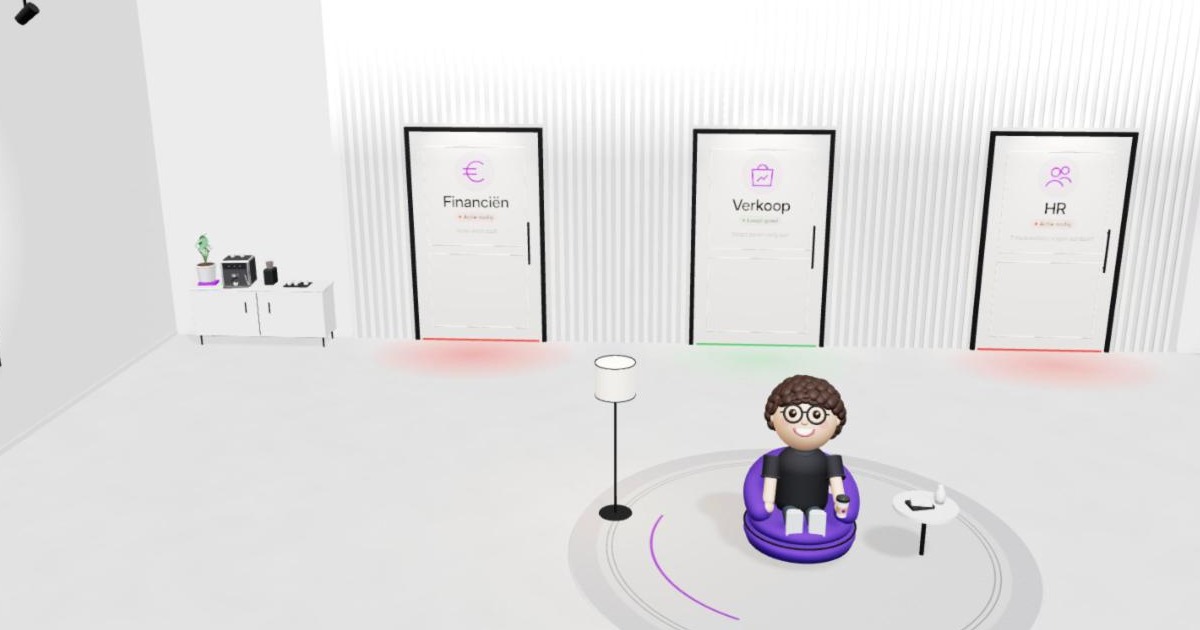
In plain words: you do not look at your numbers on a flat screen full of charts, you step into them. Your company becomes a building, each department a room, and your numbers hang on the walls. You walk from one room to the next, the way you would walk through your own business.
The idea is not new. There is a whole field of research around it, called immersive analytics, and large companies already explore their data with VR and AR solutions. What we built is a version for the owner of a small or medium-sized business: no headset, nothing to install, just the browser. Think of it as a new way to experience your numbers, not a replacement for everything you already have.
Why space and movement help
You remember where things are. People are good with places. You know where the boxes are in your warehouse without looking it up. After two visits you know that sales is on the left and HR on the right, and you walk there without thinking.
A light is faster to read than a number. Green, orange or red under a door registers in half a second. A table has to be read, compared and interpreted.
You can look at it together. A dashboard with filters is something for one person behind a screen. A building you show in a meeting, or you hand your phone to your sales manager. "Look, the sales door is orange" is a sentence everyone understands, including people who never read a chart.
A walk through the demo
There is a working demo on the homepage of illustrated.be. This is what a visit looks like.
You enter a lobby with three doors: Finance, Sales and HR. Under each door a light shines green, orange or red, with a short line next to it, such as "Net profit is falling" or "7 employees need attention". Before you have clicked anything, you know where to go first.
An avatar welcomes you, waves and says: "Come, follow me." You step through the Sales door.
In that room, cards hang on the walls: revenue, margin, your shops on a map and your top 10 products. You click on revenue and the chart comes forward, large. You see the year. You click on a month that disappointed, then on a single product, to see how that product did that month.
Finance shows real figures from the accounts: costs per category, cash, and alerts when something deviates. In the HR room you see your team with photos, sick leave, holidays and payroll cost, with a profile per employee. There you can also ask an HR assistant questions, such as "Who still has the most leave left?".
One choice is deliberate: the demo shows the detail in plain, clear charts. The 3D is the way there, not the chart itself. A bar chart in three dimensions is harder to read, not easier.
Everything runs in the browser, on your phone too, in Dutch and English. The names and personal details in the demo are made up.
Who it makes sense for, and who not (yet)
An immersive dashboard makes sense if:
- you want to see at a glance where things are red, without reading reports;
- you want to explain your numbers to your team, your partners or your bank;
- your business has a few clear areas, such as sales, finance and staff;
- you hardly ever open your current dashboard.
It is not the best choice for daily follow-up line by line. If you work through a list of open orders every morning or need to export figures to Excel, a classic dashboard or a plain table serves you better. A building is strong at overview and engagement. For line-by-line work it is a detour.
And if your numbers are not in order yet, start there. A beautiful building around a wrong number only makes that number more believable. Why that is dangerous, you can read in soon everyone builds dashboards.
How to start
It always starts from your own numbers: your accounts, your till or webshop, your payroll. Those get connected and brought together, and then we agree on what they mean. What is revenue, what is margin, when does a department turn orange? That is the real work, and it is the same work as for any good dashboard. See the data model is the work.
We set the thresholds for the light under the doors together, based on what is normal for you. Only then comes the building. The 3D is the packaging, not the work. That is why the same foundation can later feed a classic dashboard too, or the other way round.
What you can automate
Everything under the packaging. Fetching data from your accounts, till and payroll, recalculating the figures and updating the colour under each door all happen automatically every day. You can also have a message sent the moment a door turns from green to orange, so you only step inside when there is something to see.
The claim
An immersive dashboard does not make your numbers more correct, it makes them easier to look at, and a number you look at is worth more than a correct number that stays closed.
Curious how it feels? Step inside the demo on the homepage yourself. If you want to know how your own numbers would look behind those doors, we are happy to talk it through. No strings attached.